How to Verify a Shared Arc Raiders Build Before Spending Points
Check a shared build’s point budget, skill prerequisites, creator attribution and share link before copying it in game.
Treat a shared build as a configuration to inspect
A shared skill tree is useful because it makes another configuration visible. It is not, by itself, proof that the allocation suits your account, matches the latest game rules, or comes from the creator named beside it. Before spending points, separate three questions: what the link imports, whether the allocation is valid for your situation, and why you would choose it.
This distinction prevents a common mistake: treating a recognizable creator name as a substitute for checking the tree. You can learn from a configuration even when its original publication has not been verified. In that case, describe it as a listed or community-attributed route, and judge the selected skills on their own merits.
Check the destination and keep the original link
Open the link on the expected website and keep a copy before making changes. On ArcSkillTree, a creator page and a shared planner URL serve different purposes. The page provides editorial context; the build parameter carries an allocation. Editing the tree creates a variation of that configuration, not a revision to the creator's original recommendation.
Keep a small note with the page URL, original build link, and date you inspected it. Do not put email addresses, account credentials, or personal information into a public share URL. A public planner link should be treated as something other people can copy and forward, even when you initially send it only to a teammate.
Confirm the point budget before evaluating the playstyle
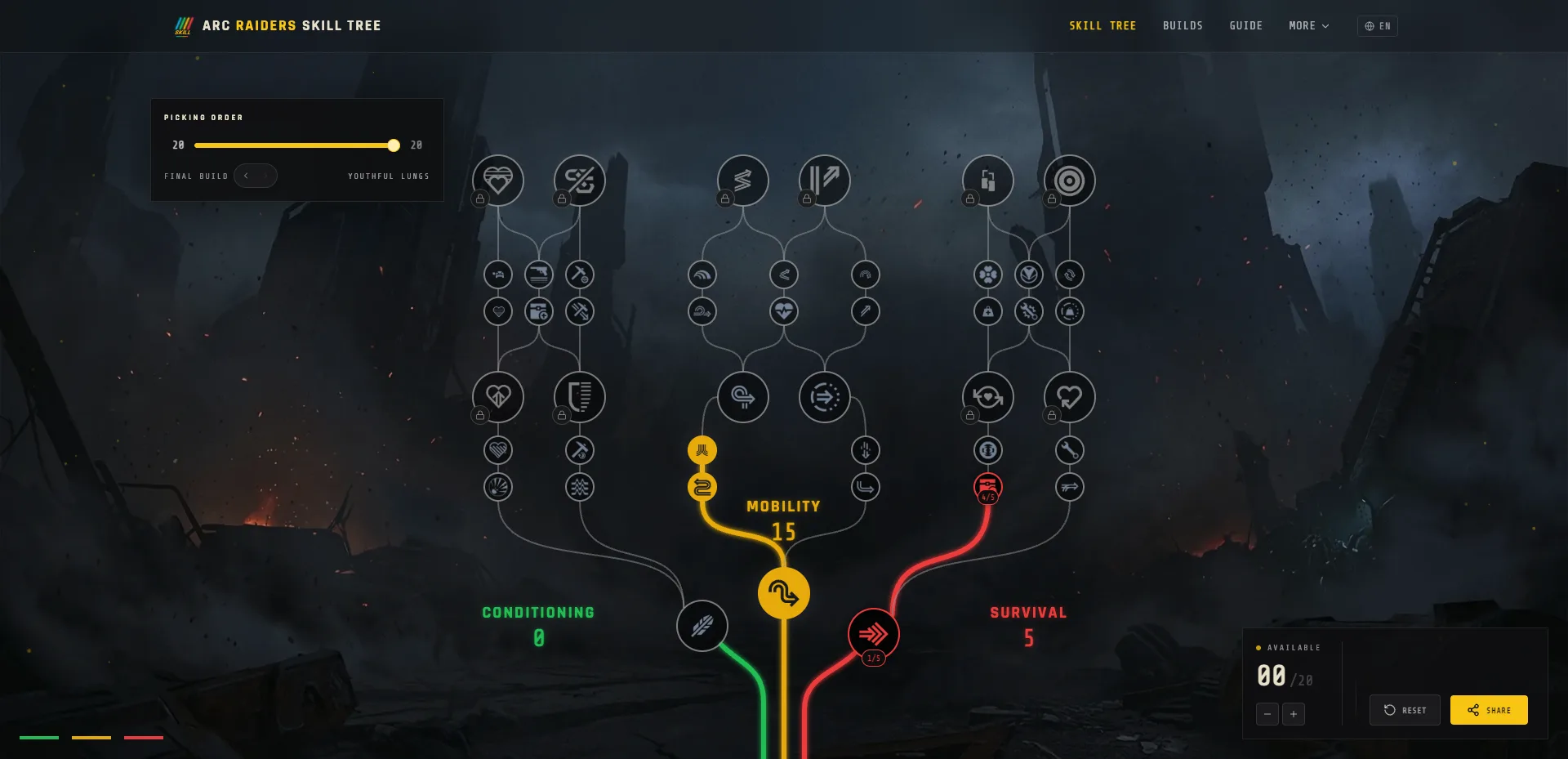
Read the imported total and compare it with the points your own account can spend. An attractive 86-point configuration does not become usable on a 76-point budget because its title matches your preferred playstyle. It requires an adaptation that removes ten points while retaining valid prerequisites.
Do not infer the current universal cap from examples on a website. Older routes, future targets, and account-specific progress can make pages show different totals. Use current in-game information for your budget, then use the planner to examine alternatives. If the two disagree, resolve that difference before spending resources on a reset or copying the allocation rank by rank.
Read branch totals as a summary, not a verdict
Mobility, Conditioning, and Survival totals provide a quick description of where the points went. They do not reveal every selected skill, and two builds with the same three totals can make different choices. Record the split, then inspect the nodes that matter for the activity you intend to perform.
For each important node, write down its rank, the condition that activates its effect, and the task it addresses. A benefit that applies while downed should not be treated as a general standing-combat benefit. A benefit related to looting does not establish a damage increase. Reading the actual description is more reliable than guessing from the skill name or its branch.
Verify prerequisites when making a change
Suppose you want to move points from a utility skill into a movement skill. The cost is not necessarily just the destination ranks. You may need to fund earlier nodes or meet a branch investment requirement. Likewise, removing a rank can affect a skill farther along the route.
Make one coherent change at a time and check what the planner permits. If the intended replacement remains locked, identify the unmet requirement instead of assuming the tool is broken. After the change, recheck the total and the important nodes you intended to preserve. A branch split that still adds up correctly does not prove that every prerequisite remains satisfied.
Compare builds against the same task
Choose a specific task before deciding which build is better. Examples include collecting containers and leaving with a full inventory, moving between objectives, or supporting a teammate during contested routes. “Best overall” hides the trade-offs that make the comparison useful.
For each candidate, identify one thing it purchases and one thing it gives up for that task. If a skill has little relevance to what you normally do, its high rank may not be an advantage for you. Conversely, a modest utility investment may be worth retaining if you use it throughout every session. These are reasons to test a route, not guarantees of better raid outcomes.
Separate attribution, calculations, and performance claims
A reliable build page distinguishes its evidence. The original creator post can support attribution. The imported code can support point totals and selected ranks. Current game descriptions or official updates can support claims about mechanics. Actual tests are needed for measured claims about speed, survival, or resource gains.
When a page lacks an original creator source, do not turn its attribution into a confirmed endorsement when sharing it. When a page shows a point distribution, do not turn that calculation into a win-rate claim. If you write notes for friends, use language such as “this allocation funds these skills” and “I want to test this for my route.” That preserves useful analysis without overstating what the evidence shows.
Reopen the exact link you intend to share
After adapting a build, use the site's share control and open the resulting link in another tab. Compare the imported total, branch split, and a few distinctive skill ranks with your edited tree. This catches the simple but frustrating mistake of sending an older link while describing a newer configuration.
If the link does not preserve the result, keep the original and report the mismatch. Include the URL, expected allocation, and what actually loaded. Avoid presenting an unverified link as a finished recommendation. A screenshot can help communicate the problem, but the exact share URL is what makes the allocation reproducible.
Use a compact final check
Before copying a build in game, confirm that the budget fits your account, the selected nodes match your intended task, and the current descriptions support your assumptions. Check attribution separately. If you changed the route, reopen the new link and label it as your adaptation.
You do not need a lengthy theory document for every experiment. A short record of the starting route, the change, and the reason is enough to make the next comparison useful. Keep observed results separate from expectations, and update the record when game rules change. The point of verification is to understand the trade-off before committing, while leaving a clear path back if the experiment does not solve your problem.
Browse the listed creator builds, use the skill tree planner, or follow the 86-to-76 budget example. Report a reproducible mismatch through the contact page.
FAQ
Does a creator name verify a shared build?
No. Check the original creator publication separately from the allocation encoded in the link.
What should I compare after reopening a share link?
Check the total budget, all three branch totals and the specific ranks you changed.
Does a valid planner code prove compatibility with the latest patch?
No. Compare the relevant current in-game descriptions and rules before spending points.